Axis
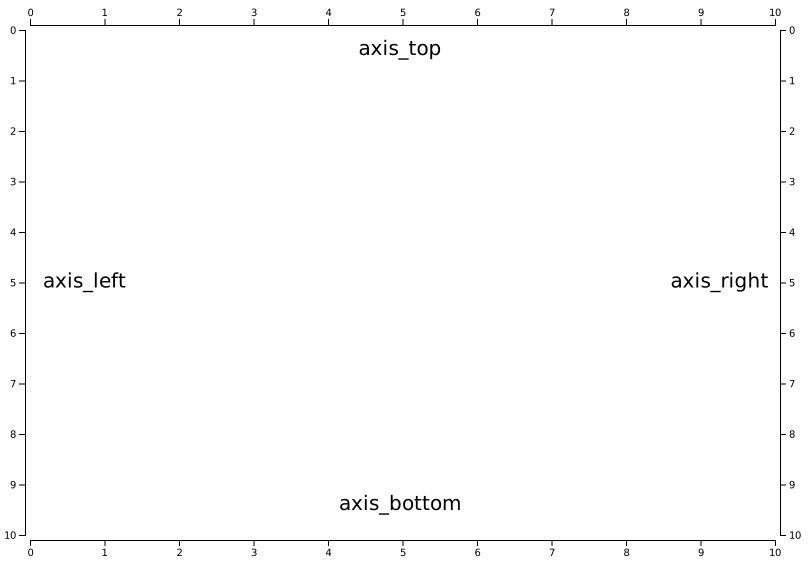

- detroit.axis_top(scale: Scaler) Axis
Builds a new top-oriented axis generator for the given scale, with empty tick arguments, a tick size of 6 and padding of 3. In this orientation, ticks are drawn above the horizontal domain path.
- detroit.axis_left(scale: Scaler) Axis
Builds a new left-oriented axis generator for the given scale, with empty tick arguments, a tick size of 6 and padding of 3. In this orientation, ticks are drawn above the vertical domain path.
- detroit.axis_right(scale: Scaler) Axis
Builds a new right-oriented axis generator for the given scale, with empty tick arguments, a tick size of 6 and padding of 3. In this orientation, ticks are drawn above the vertical domain path.
- detroit.axis_bottom(scale: Scaler) Axis
Builds a new bottom-oriented axis generator for the given scale, with empty tick arguments, a tick size of 6 and padding of 3. In this orientation, ticks are drawn above the horizontal domain path.
- class detroit.axis.axis.Axis(orient: Literal[1, 2, 3, 4], scale: Scaler)
Builds a new oriented axis generator for the given scale, with empty tick arguments, a tick size of 6 and padding of 3.
- Parameters:
orient (Literal[1, 2, 3, 4]) – Orientation
scale (Scaler) – Scaler
- __call__(context: Selection)
Render the axis to the given context, which may be either a selection of SVG containers (either SVG or G elements) or a corresponding transition.
- Parameters:
context (Selection) – Context
Examples
>>> import detroit as d3
>>> svg = d3.create("svg")
>>> svg.call(d3.axis_bottom(d3.scale_linear()))
Selection(
    groups=[[svg]],
    parents=[svg],
)
>>> print(svg.to_string())
<svg xmlns="http://www.w3.org/2000/svg" fill="none" font-size="10" font-family="sans-serif" text-anchor="middle">
  <path class="domain" stroke="currentColor" d="M0.5,6V0.5H1.5V6"/>
  <g class="tick" opacity="1" transform="translate(0.5, 0)">
    <line stroke="currentColor" y2="6"/>
    <text fill="currentColor" y="9" dy="0.71em">0.0</text>
  </g>
  <g class="tick" opacity="1" transform="translate(0.6, 0)">
    <line stroke="currentColor" y2="6"/>
    <text fill="currentColor" y="9" dy="0.71em">0.1</text>
  </g>
  <g class="tick" opacity="1" transform="translate(0.7, 0)">
    <line stroke="currentColor" y2="6"/>
    <text fill="currentColor" y="9" dy="0.71em">0.2</text>
  </g>
  <g class="tick" opacity="1" transform="translate(0.8, 0)">
    <line stroke="currentColor" y2="6"/>
    <text fill="currentColor" y="9" dy="0.71em">0.3</text>
  </g>
  <g class="tick" opacity="1" transform="translate(0.9, 0)">
    <line stroke="currentColor" y2="6"/>
    <text fill="currentColor" y="9" dy="0.71em">0.4</text>
  </g>
  <g class="tick" opacity="1" transform="translate(1.0, 0)">
    <line stroke="currentColor" y2="6"/>
    <text fill="currentColor" y="9" dy="0.71em">0.5</text>
  </g>
  <g class="tick" opacity="1" transform="translate(1.1, 0)">
    <line stroke="currentColor" y2="6"/>
    <text fill="currentColor" y="9" dy="0.71em">0.6</text>
  </g>
  <g class="tick" opacity="1" transform="translate(1.2, 0)">
    <line stroke="currentColor" y2="6"/>
    <text fill="currentColor" y="9" dy="0.71em">0.7</text>
  </g>
  <g class="tick" opacity="1" transform="translate(1.3, 0)">
    <line stroke="currentColor" y2="6"/>
    <text fill="currentColor" y="9" dy="0.71em">0.8</text>
  </g>
  <g class="tick" opacity="1" transform="translate(1.4, 0)">
    <line stroke="currentColor" y2="6"/>
    <text fill="currentColor" y="9" dy="0.71em">0.9</text>
  </g>
  <g class="tick" opacity="1" transform="translate(1.5, 0)">
    <line stroke="currentColor" y2="6"/>
    <text fill="currentColor" y="9" dy="0.71em">1.0</text>
  </g>
</svg>
Notes
Transitions are not yet implemented
- set_ticks(*ticks: int | float | str) Axis
Tick values will be passed to
scale.ticksandscale.tick_formatwhenAxis.__call__is called- Parameters:
*ticks (int | float | str) – It depends on
scaletype. Most of the time, it is the count for the number of ticks and optional format specifier- Returns:
Itself
- Return type:
Examples
To generate three ticks with percentage formatting on a linear scale :
>>> width = 810
>>> height = 30
>>> margin = 15
>>> svg = (
...     d3.create("svg")
...     .attr("width", width)
...     .attr("height", height)
...     .attr("viewBox", f"0 0 {width} {height}")
... )
>>> axis = d3.axis_bottom(d3.scale_linear().set_range([0, width - 2 * margin]))
>>> svg.append("g").attr("transform", f"translate({margin}, {margin * 0.5})").call(
...     axis.set_ticks(3, "%")
... )
Selection(
    groups=[[g]],
    parents=[svg],
)
Result


To generate ticks every fifteen minutes with a time scale :
>>> from datetime import datetime
>>> width = 810
>>> height = 30
>>> margin = 15
>>> svg = (
...     d3.create("svg")
...     .attr("width", width)
...     .attr("height", height)
...     .attr("viewBox", f"0 0 {width} {height}")
... )
>>> scale = d3.scale_time(
...     [datetime(2000, 1, 1, 12, 0), datetime(2000, 1, 1, 13, 0)], [0, 1]
... )
>>> axis = d3.axis_bottom(scale.set_range([0, width - 2 * margin]))
>>> svg.append("g").attr("transform", f"translate({margin}, {margin * 0.5})").call(
...     axis.set_ticks(d3.time_minute.every(15))
... )
Selection(
    groups=[[g]],
    parents=[svg],
)
Result


Note the similarities with
set_tick_arguments:>>> axis.set_ticks(10) # same as axis.set_tick_arguments([10])
- set_tick_arguments(tick_arguments: list[int | str]) Axis
Tick arguments will be passed to
scale.ticksandscale.tick_formatwhenAxis.__call__is called- Parameters:
tick_arguments (list[int | str]) – It depends on
scaletype. Most of the time, it is the count for the number of ticks and optional format specifier- Return type:
Itself
Examples
To generate three ticks with percentage formatting on a linear scale :
>>> # same as axis.set_ticks(3, "%")
>>> axis.set_tick_arguments([3, "%"])
To generate ticks every fifteen minutes with a time scale :
>>> # same as axis.set_ticks(d3.time_minute.every(15))
>>> axis.set_tick_arguments([d3.time_minute.every(15)])
Notes
Check
Axis.set_ticksfor more details in examples
- set_tick_values(tick_values: Iterable[int | float]) Axis
Ticks values are used for ticks rather than the scale’s automatic tick generator.
- Parameters:
tick_values (Iterable[int | float]) – Tick values
- Returns:
Itself
- Return type:
Examples
>>> width = 810
>>> height = 30
>>> margin = 15
>>> svg = (
...     d3.create("svg")
...     .attr("width", width)
...     .attr("height", height)
...     .attr("viewBox", f"0 0 {width} {height}")
... )
>>> axis = d3.axis_bottom(
...     d3.scale_linear().set_domain([0, 360]).set_range([0, width - 2 * margin])
... )
>>> (
...     svg.append("g")
...     .attr("transform", f"translate({margin}, {margin * 0.5})")
...     .call(axis.set_tick_values([0, 120, 240, 360]))
... )
Selection(
    groups=[[g]],
    parents=[svg],
)
Result


- set_tick_format(tick_format: Callable[[int | float], str]) Axis
Sets the tick format function and returns the axis.
- Parameters:
tick_format (Callable[[int | float], str]) – Tick formatter
- Returns:
Itself
- Return type:
Examples
For example, to display integers as decimal notation rounded to significant digits:
>>> width = 810
>>> height = 30
>>> margin = 15
>>> svg = (
...     d3.create("svg")
...     .attr("width", width)
...     .attr("height", height)
...     .attr("viewBox", f"0 0 {width} {height}")
... )
>>> axis = d3.axis_bottom(
...     d3.scale_linear().set_domain([0, 10_000]).set_range([0, width - 2 * margin])
... )
>>> (
...     svg.append("g")
...     .attr("transform", f"translate({margin}, {margin * 0.5})")
...     .call(axis.set_tick_format(d3.format("~s")))
... )
Selection(
    groups=[[g]],
    parents=[svg],
)
Result


- set_tick_size(tick_size: int) Axis
Sets the inner and outer tick size to the specified value and returns the axis.
- Parameters:
tick_size (int) – Tick size
- Returns:
Itself
- Return type:
Examples
>>> width = 810
>>> height = 30
>>> margin = 15
>>> svg = (
...     d3.create("svg")
...     .attr("width", width)
...     .attr("height", height)
...     .attr("viewBox", f"0 0 {width} {height}")
... )
>>> axis = d3.axis_bottom(d3.scale_linear().set_range([0, width - 2 * margin]))
>>> (
...     svg.append("g")
...     .attr("transform", f"translate({margin}, {margin * 0.5})")
...     .call(axis.set_tick_size(12))
... )
Selection(
    groups=[[g]],
    parents=[svg],
)
Result


- set_tick_size_inner(tick_size_inner: int) Axis
Sets the inner tick size to the specified value and returns the axis.
- Parameters:
tick_size_inner (int) – Inner tick size
- Returns:
Itself
- Return type:
Examples
>>> width = 810
>>> height = 30
>>> margin = 15
>>> svg = (
...     d3.create("svg")
...     .attr("width", width)
...     .attr("height", height)
...     .attr("viewBox", f"0 0 {width} {height}")
... )
>>> axis = d3.axis_bottom(d3.scale_linear().set_range([0, width - 2 * margin]))
>>> (
...     svg.append("g")
...     .attr("transform", f"translate({margin}, {margin * 0.5})")
...     .call(axis.set_tick_size_inner(0))
... )
Selection(
    groups=[[g]],
    parents=[svg],
)
Result


Notes
Inner ticks are all ticks with an associated value.
- set_tick_size_outer(tick_size_outer: int) Axis
Sets the outer tick size to the specified value and returns the axis.
- Parameters:
tick_size_outer (int) – Outer tick size
- Returns:
Itself
- Return type:
Examples
>>> width = 810
>>> height = 30
>>> margin = 15
>>> svg = (
...     d3.create("svg")
...     .attr("width", width)
...     .attr("height", height)
...     .attr("viewBox", f"0 0 {width} {height}")
... )
>>> axis = d3.axis_bottom(d3.scale_linear().set_range([0, width - 2 * margin]))
>>> (
...     svg.append("g")
...     .attr("transform", f"translate({margin}, {margin * 0.5})")
...     .call(axis.set_tick_size_outer(12))
... )
Selection(
    groups=[[g]],
    parents=[svg],
)
Result


Notes
Outer ticks are only ticks on extremities of the axis.
- set_tick_padding(tick_padding: int) Axis
Sets the padding to the specified value in pixels.
- Parameters:
tick_padding (int) – Tick padding in pixels
- Returns:
Itself
- Return type:
Examples
>>> width = 810
>>> height = 30
>>> margin = 15
>>> svg = (
...     d3.create("svg")
...     .attr("width", width)
...     .attr("height", height)
...     .attr("viewBox", f"0 0 {width} {height}")
... )
>>> axis = d3.axis_bottom(d3.scale_linear().set_range([0, width - 2 * margin]))
>>> (
...     svg.append("g")
...     .attr("transform", f"translate({margin}, {margin * 0.5})")
...     .call(axis.set_tick_padding(8))
... )
Selection(
    groups=[[g]],
    parents=[svg],
)
Result


Notes
The value
yis computing asmax(self._tick_size_inner, 0) + self._tick_padding.
- set_offset(offset: int | float) Axis
Sets the pixel offset to the specified value in pixels.
- Parameters:
offset (int | float) – Pixel offset
- Returns:
Itself
- Return type:
Examples
>>> width = 810
>>> height = 30
>>> margin = 15
>>> svg = (
...     d3.create("svg")
...     .attr("width", width)
...     .attr("height", height)
...     .attr("viewBox", f"0 0 {width} {height}")
... )
>>> axis = d3.axis_bottom(d3.scale_linear().set_range([0, width - 2 * margin]))
>>> (
...     svg.append("g")
...     .attr("transform", f"translate({margin}, {margin * 0.5})")
...     .call(axis.set_offset(8))
... )
Selection(
    groups=[[g]],
    parents=[svg],
)
Result

