Pie chart
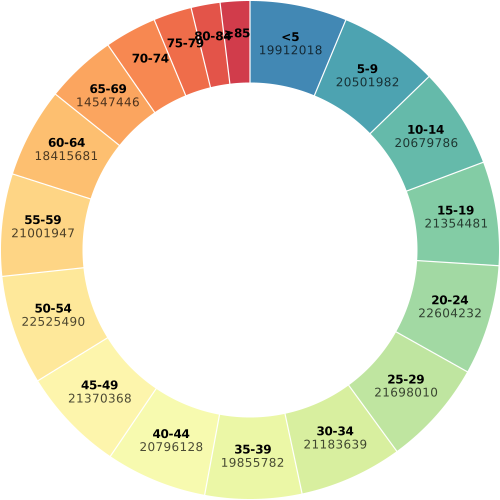
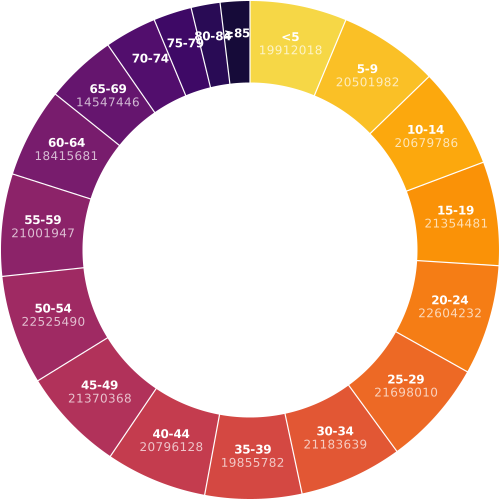
Load data
# Source : https://observablehq.com/@d3/donut-chart/2
import polars as pl # for data manipulation
import detroit as d3

URL = (
    "https://static.observableusercontent.com/files/bee673b386dd058ab8d2cf353acbedc6aa0"
    "1ebd1e6f63e2a9ab1b4273c7e6efd1eeea526345e4be7f0012d5db3ec743ef39ad9e6a043c196670bf"
    "9658cb02e79?response-content-disposition=attachment%3Bfilename*%3DUTF-8%27%27popul"
    "ation-by-age.csv"
)

data = pl.read_csv(URL)
shape: (18, 2)
┌───────┬──────────┐
│ name  ┆ value    │
│ ---   ┆ ---      │
│ str   ┆ i64      │
╞═══════╪══════════╡
│ <5    ┆ 19912018 │
│ 5-9   ┆ 20501982 │
│ 10-14 ┆ 20679786 │
│ 15-19 ┆ 21354481 │
│ 20-24 ┆ 22604232 │
│ …     ┆ …        │
│ 65-69 ┆ 14547446 │
│ 70-74 ┆ 10587721 │
│ 75-79 ┆ 7730129  │
│ 80-84 ┆ 5811429  │
│ ≥85   ┆ 5938752  │
└───────┴──────────┘
Make the pie chart
# Declare the chart dimensions.
width = 500
height = min(width, 500)
radius = min(width, height) / 2

# Declare the arc generator with its dimensions.
arc = d3.arc().set_inner_radius(radius * 0.67).set_outer_radius(radius - 1)

# Declare pie generator with its dimensions.
pie = d3.pie().set_pad_angle(1 / radius).set_sort(None).set_value(lambda d: d[1])

# Declare color scale.
color = (
    d3.scale_ordinal()
    .set_domain(data["name"].to_list())
    .set_range(
        d3.quantize(
            lambda t: d3.interpolate_spectral(t * 0.8 + 0.1),
            data.height,
        )[::-1]
    )
)

# Create the SVG container.
svg = (
    d3.create("svg")
    .attr("width", width)
    .attr("height", height)
    .attr("viewBox", f"{-width / 2} {-height / 2} {width} {height}")
    .attr("style", "max-width: 100% height: auto;")
)

# Generate pies and add arcs to the chart.
(
    svg.append("g")
    .select_all()
    .data(pie(data.iter_rows()))
    .join("path")
    .attr("fill", lambda d: color(d["data"][0]))
    .attr("d", arc)
    .append("title")
    .text(lambda d: f"{d['data'][0]}: {d['data'][1]}")
)

# Generate pies and add text on them.
(
    svg.append("g")
    .attr("font-family", "sans-serif")
    .attr("font-size", 12)
    .attr("text-anchor", "middle")
    .select_all()
    .data(pie(data.iter_rows()))
    .join("g")
    .attr(
         "transform", lambda d: f"translate({arc.centroid(d)[0]}, {arc.centroid(d)[1]})"
    )
    .call(
        lambda g: (
            g.append("text")
            .append("tspan")
            .attr("y", "-0.4em")
            .attr("font-weight", "bold")
            .text(lambda d: d["data"][0])
        )
    )
    .call(
        lambda g: (
            g.filter(lambda d: (d["end_angle"] - d["start_angle"]) > 0.25)
            .select_all("text")
            .append("tspan")
            .attr("x", 0)
            .attr("y", "0.7em")
            .attr("fill-opacity", 0.7)
            .text(lambda d: str(d["data"][1]))
        )
    )
)
Save your chart
with open("donut.svg", "w") as file:
    file.write(str(svg))