Principal Component Analysis on MNIST dataset
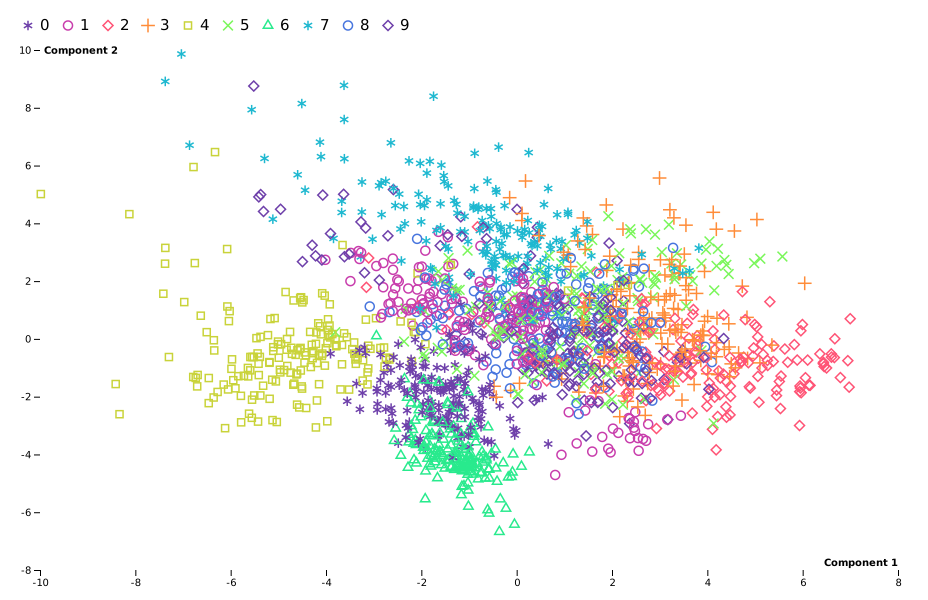
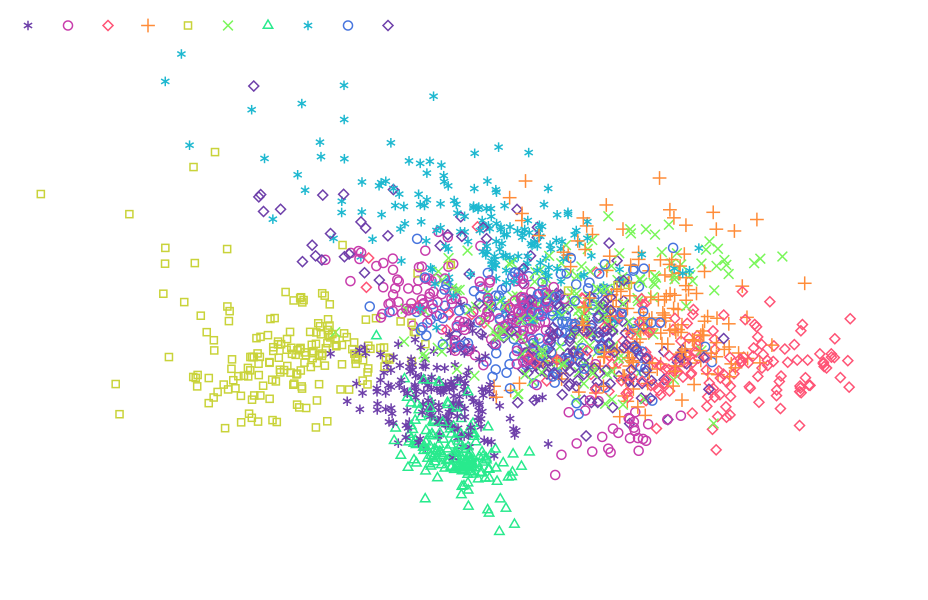
Load data
# pip install scikit-learn
import detroit as d3
import polars as pl # for data manipulation
from collections import namedtuple
from sklearn.datasets import load_digits # for MNIST dataset
from sklearn.decomposition import PCA # PCA decomposition
from sklearn.preprocessing import StandardScaler # To normalize data

# Prepare data
mnist = load_digits() # load data
scaler = StandardScaler() # initialize scaler
X_scaled = scaler.fit_transform(mnist.data) # update scaler and normalize data
pca = PCA(n_components=2) # initialize PCA decomposition
components = pca.fit_transform(X_scaled) # update PCA and transform data

df = pl.DataFrame(components, schema=["Component 1", "Component 2"])
df = df.insert_column(2, pl.Series("digit", mnist.target)) # add digit as "Z-axis" for color
shape: (1_797, 3)
┌─────────────┬─────────────┬───────┐
│ Component 1 ┆ Component 2 ┆ digit │
│ ---         ┆ ---         ┆ ---   │
│ f64         ┆ f64         ┆ i64   │
╞═════════════╪═════════════╪═══════╡
│ 1.914217    ┆ -0.954454   ┆ 0     │
│ 0.58898     ┆ 0.924555    ┆ 1     │
│ 1.302033    ┆ -0.317105   ┆ 2     │
│ -3.02077    ┆ -0.868772   ┆ 3     │
│ 4.528946    ┆ -1.093314   ┆ 4     │
│ …           ┆ …           ┆ …     │
│ 0.104338    ┆ 0.254933    ┆ 9     │
│ 2.423241    ┆ -1.429641   ┆ 0     │
│ 1.022598    ┆ -0.148016   ┆ 8     │
│ 1.076056    ┆ -0.380974   ┆ 9     │
│ -1.257696   ┆ -2.227632   ┆ 8     │
└─────────────┴─────────────┴───────┘
Make the PCA chart
# Specify the chart's dimensions
width = 928
height = 600

Margin = namedtuple("Margin", ["top", "right", "bottom", "left"])
margin = Margin(50, 30, 30, 40)


# Create the horizontal x scale
x = (
    d3.scale_linear()
    .set_domain([df["Component 1"].min(), df["Component 1"].max()])
    .nice()
    .set_range([margin.left, width - margin.right])
)

# Create the vertical y scale
y = (
    d3.scale_linear()
    .set_domain([df["Component 2"].min(), df["Component 2"].max()])
    .nice()
    .set_range([height - margin.bottom, margin.top])
)

svg = (
    d3.create("svg")
    .attr("width", width)
    .attr("height", height)
    .attr("viewBox", f"0 0 {width} {height}")
)

# Append the axis

(
    svg.append("g")
    .attr("transform", f"translate(0, {height - margin.bottom})")
    .call(d3.axis_bottom(x))
    .call(lambda g: g.select(".domain").remove())
    .call(
        lambda g: g.append("text")
        .attr("x", width - margin.right)
        .attr("y", -4)
        .attr("fill", "#000")
        .attr("font-weight", "bold")
        .attr("text-anchor", "end")
        .text("Component 1")
    )
)

(
    svg.append("g")
    .attr("transform", f"translate({margin.left}, 0)")
    .call(d3.axis_left(y))
    .call(lambda g: g.select(".domain").remove())
    .call(
        lambda g: g.select(".tick:last-of-type")
        .select("text")
        .clone()
        .attr("x", 4)
        .attr("text-anchor", "start")
        .attr("font-weight", "bold")
        .text("Component 2")
    )
)

# Append the symbols

symbol_type = d3.scale_ordinal(df["digit"].unique().sort().to_list(), d3.SYMBOLS_STROKE)

color = d3.scale_sequential(
    [df["digit"].min(), df["digit"].max()], d3.interpolate_rainbow
)

(
    svg.append("g")
    .attr("fill", "none")
    .attr("stroke-width", 1.5)
    .select_all("symbol")
    .data(df.iter_rows())
    .join("g")
    .attr("transform", lambda d: f"translate({x(d[0])}, {y(d[1])})")
    .append("path")
    .attr("d", lambda d: d3.symbol(symbol_type(d[2]))())
    .attr("stroke", lambda d: color(d[2]))
)

# Legend

labels = df["digit"].unique().sort()
nb_columns = labels.len()  # number of labels
offset = 40  # Space between legend labels
symbol_size = 3

legend = svg.append("g").select_all("legend").data(labels.to_list()).enter()

(
    legend.append("g")
    .attr(
        "transform",
        lambda _, i: f"translate({i * offset + margin.left - symbol_size * 4}, {30 - symbol_size * 1.5})"
    )
    .append("path")
    .attr("d", lambda d: d3.symbol(symbol_type(d))())
    .style("stroke-width", 1.5)
    .style("stroke", lambda d: color(d))
    .style("fill", "none")
)

(
    legend.append("text")
    .attr("x", lambda _, i: i * offset + margin.left)
    .attr("y", 30)
    .text(lambda d: str(d))
    .style("fill", "black")
    .style("font-size", 15)
)
Save your chart
with open("pca.svg", "w") as file:
    file.write(str(svg))