Curves
- detroit.curve_basis(context: Path) Curve
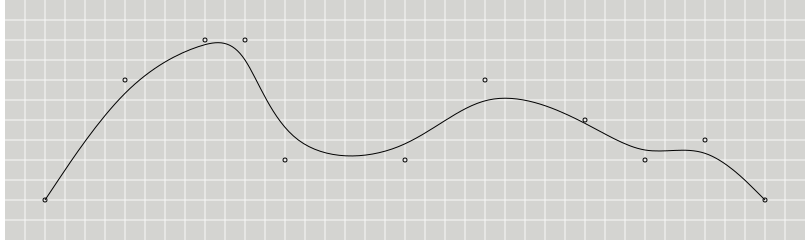
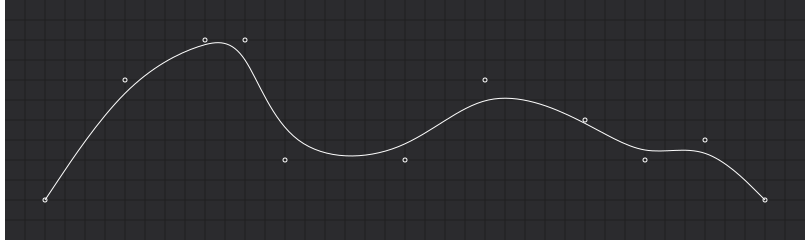
Produces a cubic basis spline using the specified control points. The first and last points are triplicated such that the spline starts at the first point and ends at the last point, and is tangent to the line between the first and second points, and to the line between the penultimate and last points.
Examples
>>> points = [
...     [2, 2],
...     [6, 8],
...     [10, 10],
...     [12, 10],
...     [14, 4],
...     [20, 4],
...     [24, 8],
...     [29, 6],
...     [32, 4],
...     [35, 5],
...     [38, 2],
... ]
>>> line = d3.line().curve(d3.curve_basis)
>>> line(points)
'M2,2L2.667,3C3.333,4,4.667,6,6,7.333C7.333,8.667,8.667,9.333,9.667,9.667C10.667,10,11.333,10,12,9C12.667,8,13.333,6,14.667,5C16,4,18,4,19.667,4.667C21.333,5.333,22.667,6.667,24.167,7C25.667,7.333,27.333,6.667,28.667,6C30,5.333,31,4.667,32,4.500C33,4.333,34,4.667,35,4.333C36,4,37,3,37.500,2.500L38,2'
Result
- detroit.curve_basis_closed(context: Path) Curve
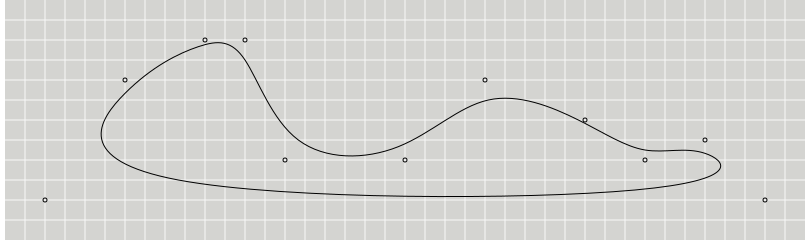
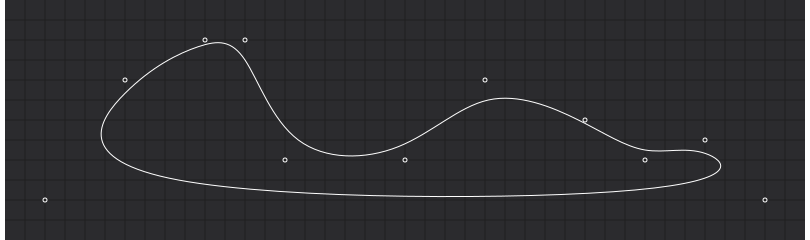
Produces a closed cubic basis spline using the specified control points. When a line segment ends, the first three control points are repeated, producing a closed loop with \(C^2\) continuity.
Examples
>>> points = [
...     [2, 2],
...     [6, 8],
...     [10, 10],
...     [12, 10],
...     [14, 4],
...     [20, 4],
...     [24, 8],
...     [29, 6],
...     [32, 4],
...     [35, 5],
...     [38, 2],
... ]
>>> line = d3.line().curve(d3.curve_basis_closed)
>>> line(points)
'M6,7.333C7.333,8.667,8.667,9.333,9.667,9.667C10.667,10,11.333,10,12,9C12.667,8,13.333,6,14.667,5C16,4,18,4,19.667,4.667C21.333,5.333,22.667,6.667,24.167,7C25.667,7.333,27.333,6.667,28.667,6C30,5.333,31,4.667,32,4.500C33,4.333,34,4.667,35,4.333C36,4,37,3,31.500,2.500C26,2,14,2,8.667,3C3.333,4,4.667,6,6,7.333'
Result
- detroit.curve_basis_open(context: Path) Curve
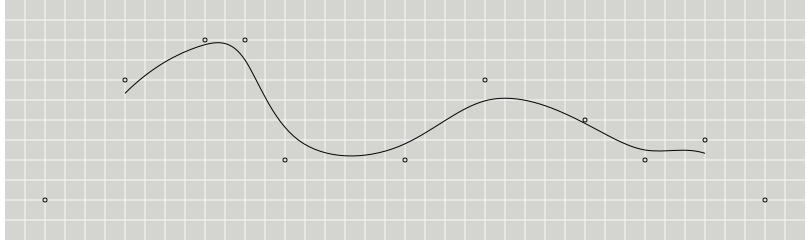
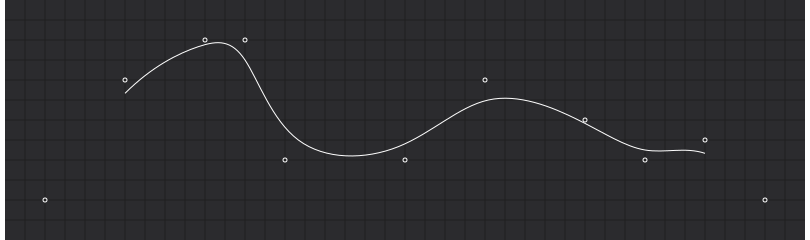
Produces a cubic basis spline using the specified control points. Unlike basis, the first and last points are not repeated, and thus the curve typically does not intersect these points.
Examples
>>> points = [
...     [2, 2],
...     [6, 8],
...     [10, 10],
...     [12, 10],
...     [14, 4],
...     [20, 4],
...     [24, 8],
...     [29, 6],
...     [32, 4],
...     [35, 5],
...     [38, 2],
... ]
>>> line = d3.line().curve(d3.curve_basis_open)
>>> line(points)
'M6,7.333C7.333,8.667,8.667,9.333,9.667,9.667C10.667,10,11.333,10,12,9C12.667,8,13.333,6,14.667,5C16,4,18,4,19.667,4.667C21.333,5.333,22.667,6.667,24.167,7C25.667,7.333,27.333,6.667,28.667,6C30,5.333,31,4.667,32,4.500C33,4.333,34,4.667,35,4.333'
Result
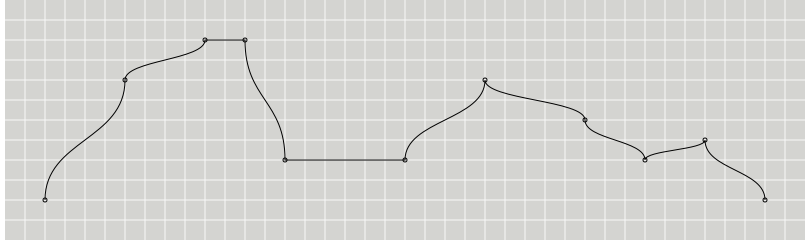
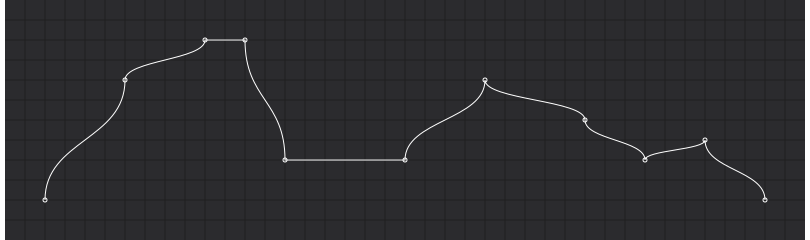
- detroit.curve_bump_x(context: Path) Curve
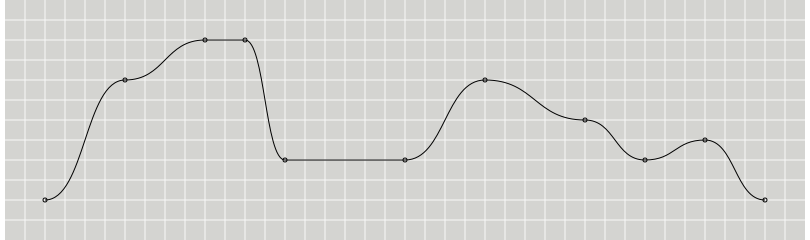
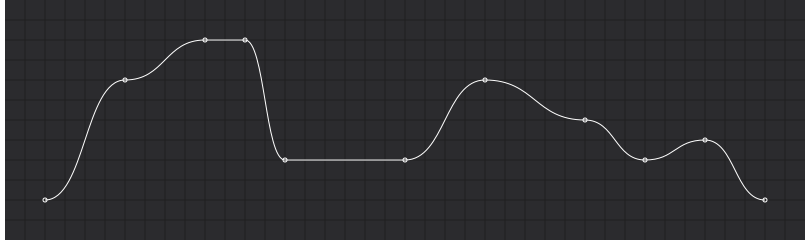
Produces a Bézier curve between each pair of points, with horizontal tangents at each point.
Examples
>>> points = [
...     [2, 2],
...     [6, 8],
...     [10, 10],
...     [12, 10],
...     [14, 4],
...     [20, 4],
...     [24, 8],
...     [29, 6],
...     [32, 4],
...     [35, 5],
...     [38, 2],
... ]
>>> line = d3.line().curve(d3.curve_bump_x)
>>> line(points)
'M2,2C4,2,4,8,6,8C8,8,8,10,10,10C11,10,11,10,12,10C13,10,13,4,14,4C17,4,17,4,20,4C22,4,22,8,24,8C26.500,8,26.500,6,29,6C30.500,6,30.500,4,32,4C33.500,4,33.500,5,35,5C36.500,5,36.500,2,38,2'
Result
- detroit.curve_bump_y(context: Path) Curve
Produces a Bézier curve between each pair of points, with vertical tangents at each point.
Examples
>>> points = [
...     [2, 2],
...     [6, 8],
...     [10, 10],
...     [12, 10],
...     [14, 4],
...     [20, 4],
...     [24, 8],
...     [29, 6],
...     [32, 4],
...     [35, 5],
...     [38, 2],
... ]
>>> line = d3.line().curve(d3.curve_bump_y)
>>> line(points)
'M2,2C2,5,6,5,6,8C6,9,10,9,10,10C10,10,12,10,12,10C12,7,14,7,14,4C14,4,20,4,20,4C20,6,24,6,24,8C24,7,29,7,29,6C29,5,32,5,32,4C32,4.500,35,4.500,35,5C35,3.500,38,3.500,38,2'
Result
- detroit.curve_bundle(context_or_beta: Path | int | float) Callable[[Path], Curve] | Curve
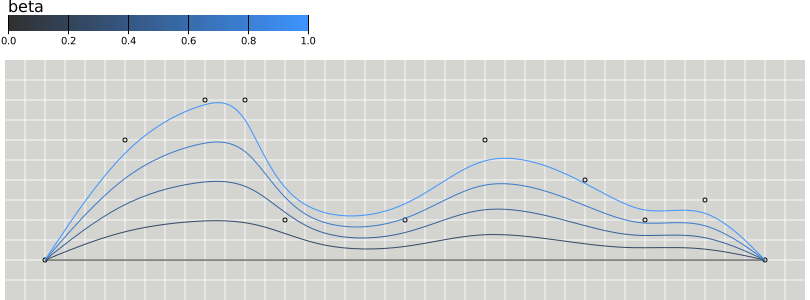
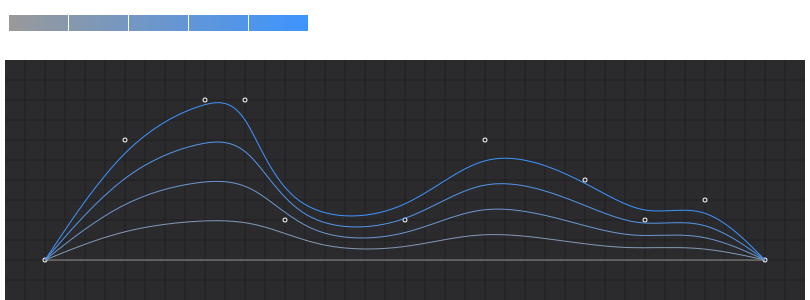
Produces a straightened cubic basis spline using the specified control points, with the spline straightened according to the curve’s beta. This curve is typically used in hierarchical edge bundling to disambiguate connections, as proposed by Danny Holten in Hierarchical Edge Bundles: Visualization of Adjacency Relations in Hierarchical Data. Default value of beta is
0.85.- Parameters:
context_or_beta (Path | Number) – Context or beta value in range \([0, 1]\) representing the bundle strength
- Returns:
Curve object or function which makes a curve object with beta value set
- Return type:
Examples
>>> points = [
...     [2, 2],
...     [6, 8],
...     [10, 10],
...     [12, 10],
...     [14, 4],
...     [20, 4],
...     [24, 8],
...     [29, 6],
...     [32, 4],
...     [35, 5],
...     [38, 2],
... ]
>>> line = d3.line().curve(d3.curve_bundle)
>>> line(points)
'M2,2L2.657,2.850C3.313,3.700,4.627,5.400,5.940,6.533C7.253,7.667,8.567,8.233,9.597,8.517C10.627,8.800,11.373,8.800,12.120,7.950C12.867,7.100,13.613,5.400,14.927,4.550C16.240,3.700,18.120,3.700,19.717,4.267C21.313,4.833,22.627,5.967,24.082,6.250C25.537,6.533,27.133,5.967,28.447,5.400C29.760,4.833,30.790,4.267,31.820,4.125C32.850,3.983,33.880,4.267,34.910,3.983C35.940,3.700,36.970,2.850,37.485,2.425L38,2'
>>> line = d3.line().curve(d3.curve_bundle(0.5))
>>> line(points)
'M2,2L2.633,2.500C3.267,3,4.533,4,5.800,4.667C7.067,5.333,8.333,5.667,9.433,5.833C10.533,6,11.467,6,12.400,5.500C13.333,5,14.267,4,15.533,3.500C16.800,3,18.400,3,19.833,3.333C21.267,3.667,22.533,4.333,23.883,4.500C25.233,4.667,26.667,4.333,27.933,4C29.200,3.667,30.300,3.333,31.400,3.250C32.500,3.167,33.600,3.333,34.700,3.167C35.800,3,36.900,2.500,37.450,2.250L38,2'
Result
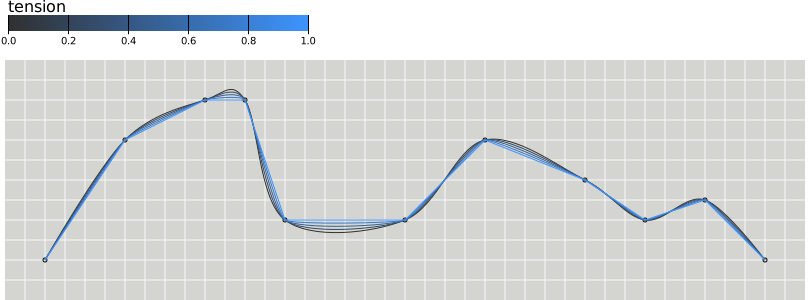
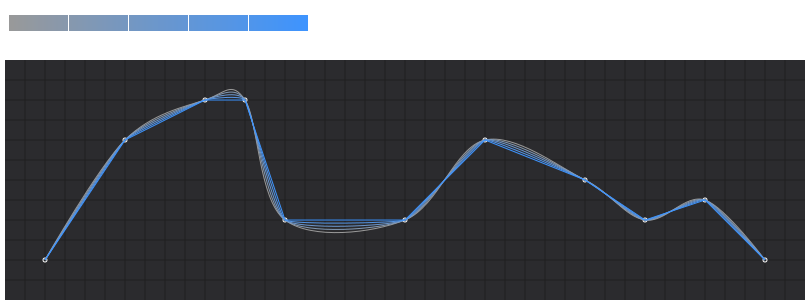
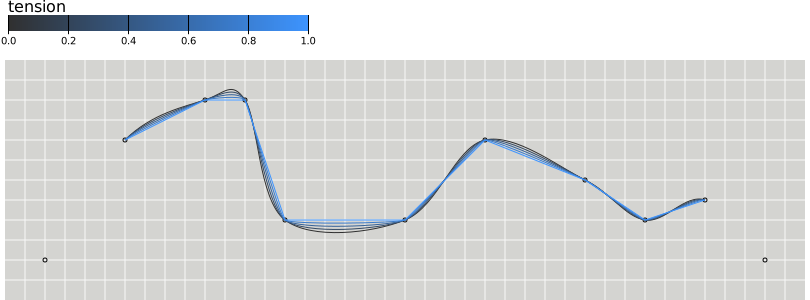
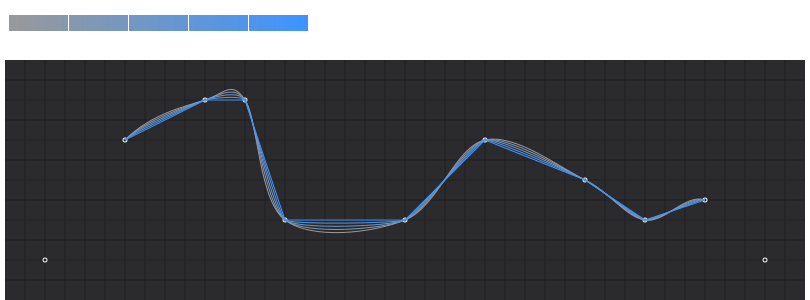
- detroit.curve_cardinal(context_or_tension: Path | int | float) Callable[[Path], Curve] | Curve
Produces a cubic cardinal spline using the specified control points, with one-sided differences used for the first and last piece. The default tension is
0.- Parameters:
context_or_tension (Path | Number) – Context or tension value in range \([0, 1]\) determining the length of the tangents. A tension of one yields all zero tangents, equivalent to
d3.curve_linear- Returns:
Curve object or function which makes a curve object with tension value set
- Return type:
Examples
>>> points = [
...     [2, 2],
...     [6, 8],
...     [10, 10],
...     [12, 10],
...     [14, 4],
...     [20, 4],
...     [24, 8],
...     [29, 6],
...     [32, 4],
...     [35, 5],
...     [38, 2],
... ]
>>> line(points)
'M2,2C2,2,4.667,6.667,6,8C7.333,9.333,9,9.667,10,10C11,10.333,11.333,11,12,10C12.667,9,12.667,5,14,4C15.333,3,18.333,3.333,20,4C21.667,4.667,22.500,7.667,24,8C25.500,8.333,27.667,6.667,29,6C30.333,5.333,31,4.167,32,4C33,3.833,34,5.333,35,5C36,4.667,38,2,38,2'
>>> line = d3.line().curve(d3.curve_cardinal(0.5))
>>> line(points)
'M2,2C2,2,5.333,7.333,6,8C6.667,8.667,9.500,9.833,10,10C10.500,10.167,11.667,10.500,12,10C12.333,9.500,13.333,4.500,14,4C14.667,3.500,19.167,3.667,20,4C20.833,4.333,23.250,7.833,24,8C24.750,8.167,28.333,6.333,29,6C29.667,5.667,31.500,4.083,32,4C32.500,3.917,34.500,5.167,35,5C35.500,4.833,38,2,38,2'
Result
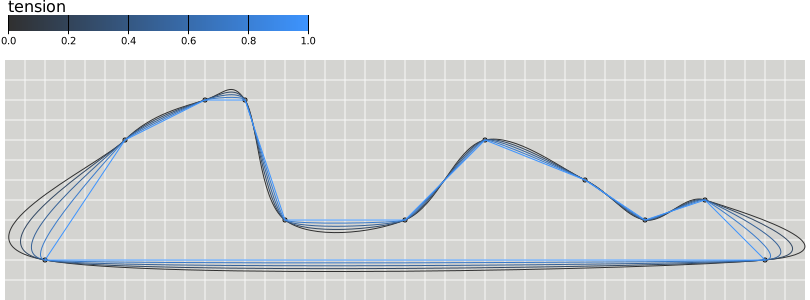
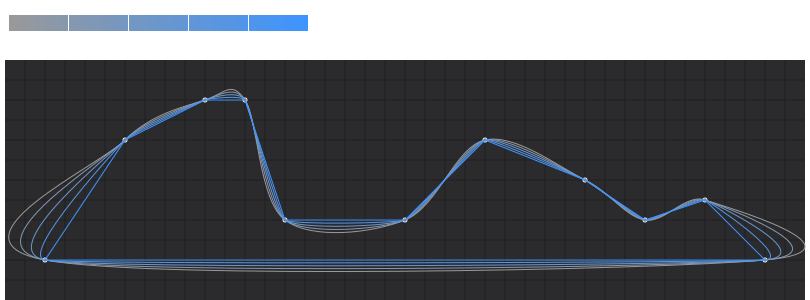
- detroit.curve_cardinal_closed(context_or_tension: Path | int | float) Callable[[Path], Curve] | Curve
Produces a closed cubic cardinal spline using the specified control points. When a line segment ends, the first three control points are repeated, producing a closed loop. The default tension is
0.- Parameters:
context_or_tension (Path | Number) – Context or tension value in range \([0, 1]\) determining the length of the tangents. A tension of one yields all zero tangents, equivalent to
d3.curve_linear- Returns:
Curve object or function which makes a curve object with tension value set
- Return type:
Examples
>>> points = [
...     [2, 2],
...     [6, 8],
...     [10, 10],
...     [12, 10],
...     [14, 4],
...     [20, 4],
...     [24, 8],
...     [29, 6],
...     [32, 4],
...     [35, 5],
...     [38, 2],
... ]
>>> line = d3.line().curve(d3.curve_cardinal_closed)
>>> line(points)
'M6,8C7.333,9.333,9,9.667,10,10C11,10.333,11.333,11,12,10C12.667,9,12.667,5,14,4C15.333,3,18.333,3.333,20,4C21.667,4.667,22.500,7.667,24,8C25.500,8.333,27.667,6.667,29,6C30.333,5.333,31,4.167,32,4C33,3.833,34,5.333,35,5C36,4.667,43.500,2.500,38,2C32.500,1.500,7.333,1,2,2C-3.333,3,4.667,6.667,6,8'
>>> line = d3.line().curve(d3.curve_cardinal_closed(0.5))
>>> line(points)
'M6,8C6.667,8.667,9.500,9.833,10,10C10.500,10.167,11.667,10.500,12,10C12.333,9.500,13.333,4.500,14,4C14.667,3.500,19.167,3.667,20,4C20.833,4.333,23.250,7.833,24,8C24.750,8.167,28.333,6.333,29,6C29.667,5.667,31.500,4.083,32,4C32.500,3.917,34.500,5.167,35,5C35.500,4.833,40.750,2.250,38,2C35.250,1.750,4.667,1.500,2,2C-0.667,2.500,5.333,7.333,6,8'
Result
- detroit.curve_cardinal_open(context_or_tension: Path | int | float) Callable[[Path], Curve] | Curve
Produces a cubic cardinal spline using the specified control points. Unlike curveCardinal, one-sided differences are not used for the first and last piece, and thus the curve starts at the second point and ends at the penultimate point. The default tension is \(0\).
- Parameters:
context_or_tension (Path | Number) – Context or tension value in range \([0, 1]\) determining the length of the tangents. A tension of one yields all zero tangents, equivalent to
d3.curve_linear- Returns:
Curve object or function which makes a curve object with tension value set
- Return type:
Examples
>>> points = [
...     [2, 2],
...     [6, 8],
...     [10, 10],
...     [12, 10],
...     [14, 4],
...     [20, 4],
...     [24, 8],
...     [29, 6],
...     [32, 4],
...     [35, 5],
...     [38, 2],
... ]
>>> line(points)
'M6,8C7.333,9.333,9,9.667,10,10C11,10.333,11.333,11,12,10C12.667,9,12.667,5,14,4C15.333,3,18.333,3.333,20,4C21.667,4.667,22.500,7.667,24,8C25.500,8.333,27.667,6.667,29,6C30.333,5.333,31,4.167,32,4C33,3.833,34,5.333,35,5'
>>> line = d3.line().curve(d3.curve_cardinal_open(0.5))
>>> line(points)
'M6,8C6.667,8.667,9.500,9.833,10,10C10.500,10.167,11.667,10.500,12,10C12.333,9.500,13.333,4.500,14,4C14.667,3.500,19.167,3.667,20,4C20.833,4.333,23.250,7.833,24,8C24.750,8.167,28.333,6.333,29,6C29.667,5.667,31.500,4.083,32,4C32.500,3.917,34.500,5.167,35,5'
Result
- detroit.curve_catmull_rom(context_or_alpha: Path | int | float) Callable[[Path], Curve] | Curve
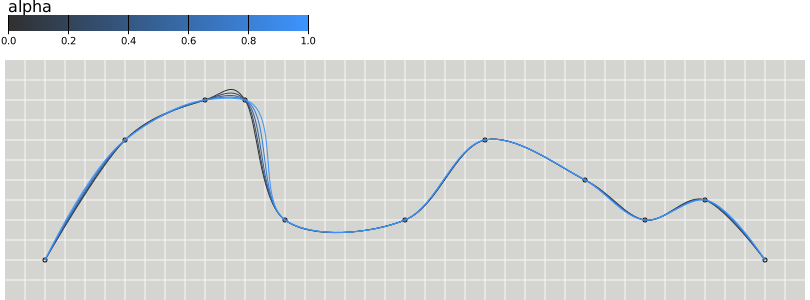
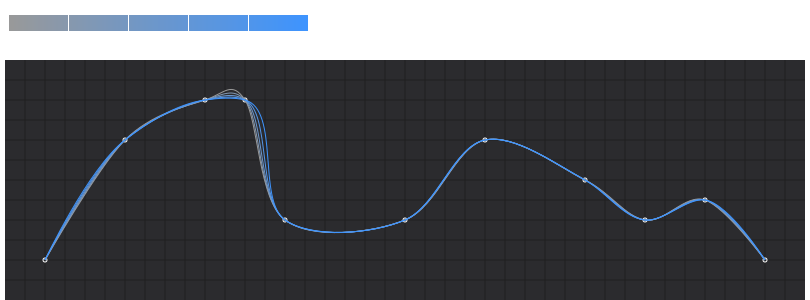
Produces a cubic Catmull–Rom spline using the specified control points and the parameter alpha, as proposed by Yuksel et al. in On the Parameterization of Catmull–Rom Curves, with one-sided differences used for the first and last piece. Default alpha value is
0.5.- Parameters:
context_or_alpha (Path | Number) – Context or alpha value in range \([0, 1]\). If alpha is zero, produces a uniform spline, equivalent to curveCardinal with a tension of zero; if alpha is one, produces a chordal spline; if alpha is 0.5, produces a centripetal spline. Centripetal splines are recommended to avoid self-intersections and overshoot.
- Returns:
Curve object or function which makes a curve object with alpha value set
- Return type:
Examples
>>> points = [
...     [2, 2],
...     [6, 8],
...     [10, 10],
...     [12, 10],
...     [14, 4],
...     [20, 4],
...     [24, 8],
...     [29, 6],
...     [32, 4],
...     [35, 5],
...     [38, 2],
... ]
>>> line(points)
'M2,2C2,2,4.465,6.645,6,8C7.209,9.067,8.868,9.733,10,10C10.757,10.179,11.438,10.405,12,10C12.999,9.280,12.631,4.987,14,4C15.334,3.039,18.318,3.303,20,4C21.633,4.676,22.477,7.687,24,8C25.486,8.305,27.578,6.748,29,6C30.164,5.388,30.965,4.139,32,4C32.969,3.870,34.063,5.221,35,5C36.085,4.744,38,2,38,2'
>>> line = d3.line().curve(d3.curve_catmull_rom(0.2))
>>> line(points)
'M2,2C2,2,4.597,6.663,6,8C7.275,9.215,8.964,9.693,10,10C10.882,10.261,11.394,10.703,12,10C12.763,9.115,12.653,4.995,14,4C15.333,3.016,18.327,3.321,20,4C21.653,4.671,22.491,7.675,24,8C25.494,8.322,27.637,6.696,29,6C30.258,5.358,30.987,4.156,32,4C32.987,3.848,34.028,5.286,35,5C36.031,4.697,38,2,38,2'
Result
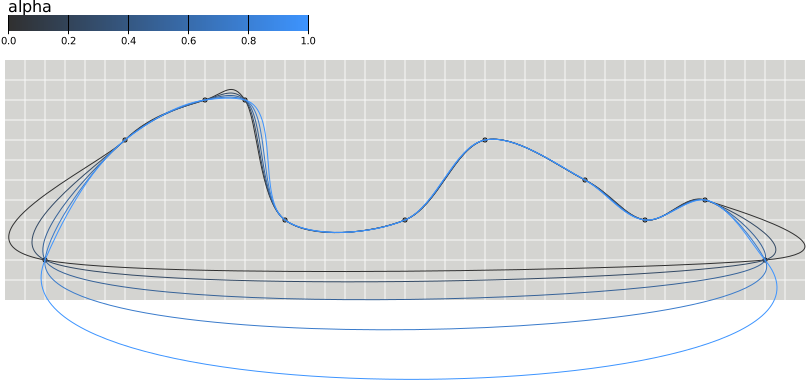
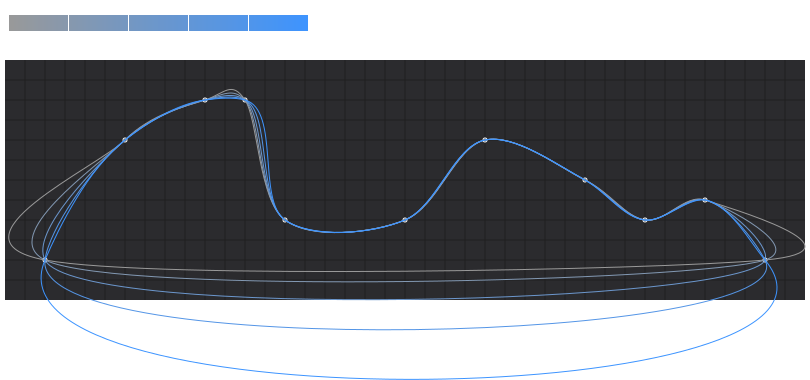
- detroit.curve_catmull_rom_closed(context_or_alpha: Path | int | float) Callable[[Path], Curve] | Curve
Produces a closed cubic Catmull–Rom spline using the specified control points and the parameter alpha, as proposed by Yuksel et al. When a line segment ends, the first three control points are repeated, producing a closed loop. Default alpha value is
0.5.- Parameters:
context_or_alpha (Path | Number) – Context or alpha value in range \([0, 1]\). If alpha is zero, produces a uniform spline, equivalent to curveCardinal with a tension of zero; if alpha is one, produces a chordal spline; if alpha is 0.5, produces a centripetal spline. Centripetal splines are recommended to avoid self-intersections and overshoot.
- Returns:
Curve object or function which makes a curve object with alpha value set
- Return type:
Examples
>>> points = [
...     [2, 2],
...     [6, 8],
...     [10, 10],
...     [12, 10],
...     [14, 4],
...     [20, 4],
...     [24, 8],
...     [29, 6],
...     [32, 4],
...     [35, 5],
...     [38, 2],
... ]
>>> line = d3.line().curve(d3.curve_catmull_rom_closed)
>>> line(points)
'M6,8C7.209,9.067,8.868,9.733,10,10C10.757,10.179,11.438,10.405,12,10C12.999,9.280,12.631,4.987,14,4C15.334,3.039,18.318,3.303,20,4C21.633,4.676,22.477,7.687,24,8C25.486,8.305,27.578,6.748,29,6C30.164,5.388,30.965,4.139,32,4C32.969,3.870,34.063,5.221,35,5C36.085,4.744,38.308,2.744,38,2C37.102,-0.169,3.652,-1.087,2,2C1.261,3.382,4.465,6.645,6,8'
>>> line = d3.line().curve(d3.curve_catmull_rom_closed(0.2))
>>> line(points)
'M6,8C7.275,9.215,8.964,9.693,10,10C10.882,10.261,11.394,10.703,12,10C12.763,9.115,12.653,4.995,14,4C15.333,3.016,18.327,3.321,20,4C21.653,4.671,22.491,7.675,24,8C25.494,8.322,27.637,6.696,29,6C30.258,5.358,30.987,4.156,32,4C32.987,3.848,34.028,5.286,35,5C36.031,4.697,40.483,2.605,38,2C34.192,1.072,5.977,0.401,2,2C-0.884,3.159,4.597,6.663,6,8'
Result
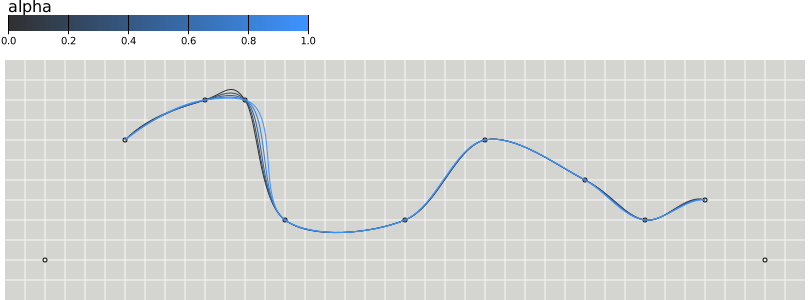
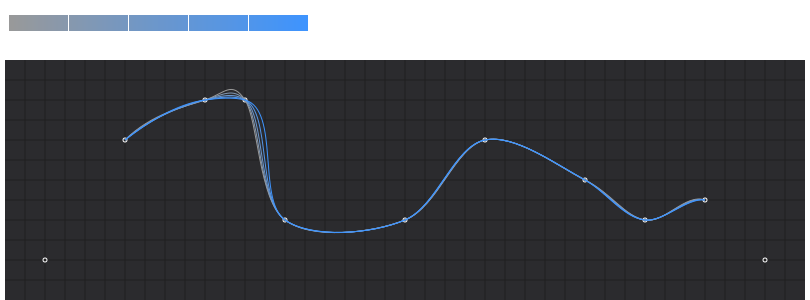
- detroit.curve_catmull_rom_open(context_or_alpha: Path | int | float) Callable[[Path], Curve] | Curve
Produces a cubic Catmull–Rom spline using the specified control points and the parameter alpha, as proposed by Yuksel et al. Unlike curveCatmullRom, one-sided differences are not used for the first and last piece, and thus the curve starts at the second point and ends at the penultimate point. Default alpha value is
0.5.- Parameters:
context_or_alpha (Path | Number) – Context or alpha value in range \([0, 1]\). If alpha is zero, produces a uniform spline, equivalent to curveCardinal with a tension of zero; if alpha is one, produces a chordal spline; if alpha is 0.5, produces a centripetal spline. Centripetal splines are recommended to avoid self-intersections and overshoot.
- Returns:
Curve object or function which makes a curve object with alpha value set
- Return type:
Examples
>>> points = [
...     [2, 2],
...     [6, 8],
...     [10, 10],
...     [12, 10],
...     [14, 4],
...     [20, 4],
...     [24, 8],
...     [29, 6],
...     [32, 4],
...     [35, 5],
...     [38, 2],
... ]
>>> line = d3.line().curve(d3.curve_catmull_rom_open)
>>> line(points)
'M6,8C7.209,9.067,8.868,9.733,10,10C10.757,10.179,11.438,10.405,12,10C12.999,9.280,12.631,4.987,14,4C15.334,3.039,18.318,3.303,20,4C21.633,4.676,22.477,7.687,24,8C25.486,8.305,27.578,6.748,29,6C30.164,5.388,30.965,4.139,32,4C32.969,3.870,34.063,5.221,35,5'
>>> line = d3.line().curve(d3.curve_catmull_rom_open(0.2))
>>> line(points)
'M6,8C7.275,9.215,8.964,9.693,10,10C10.882,10.261,11.394,10.703,12,10C12.763,9.115,12.653,4.995,14,4C15.333,3.016,18.327,3.321,20,4C21.653,4.671,22.491,7.675,24,8C25.494,8.322,27.637,6.696,29,6C30.258,5.358,30.987,4.156,32,4C32.987,3.848,34.028,5.286,35,5'
Result
- detroit.curve_linear(context: Path) Curve
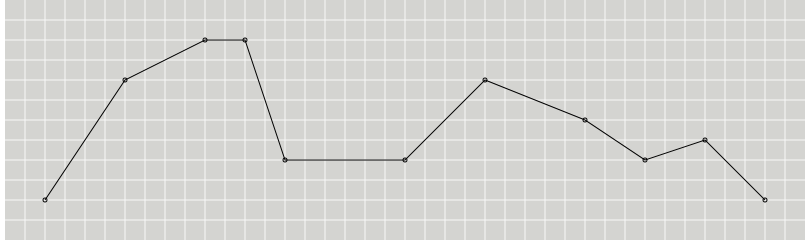
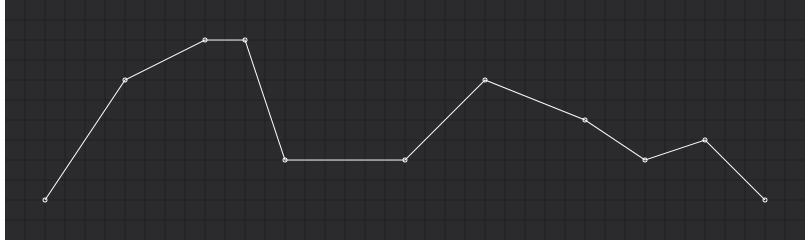
Produces a polyline through the specified points.
Examples
>>> points = [
...     [2, 2],
...     [6, 8],
...     [10, 10],
...     [12, 10],
...     [14, 4],
...     [20, 4],
...     [24, 8],
...     [29, 6],
...     [32, 4],
...     [35, 5],
...     [38, 2],
... ]
>>> line = d3.line().curve(d3.curve_linear)
>>> line(points)
'M2,2L6,8L10,10L12,10L14,4L20,4L24,8L29,6L32,4L35,5L38,2'
Result
- detroit.curve_linear_closed(context: Path) Curve
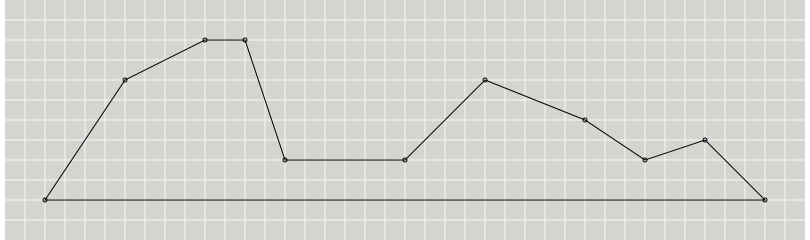
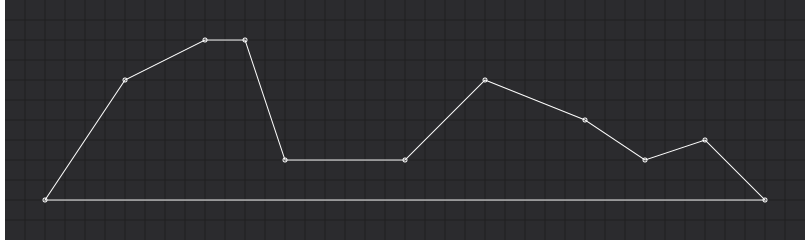
Produces a closed polyline through the specified points by repeating the first point when the line segment ends.
Examples
>>> points = [
...     [2, 2],
...     [6, 8],
...     [10, 10],
...     [12, 10],
...     [14, 4],
...     [20, 4],
...     [24, 8],
...     [29, 6],
...     [32, 4],
...     [35, 5],
...     [38, 2],
... ]
>>> line = d3.line().curve(d3.curve_linear_closed)
>>> line(points)
'M2,2L6,8L10,10L12,10L14,4L20,4L24,8L29,6L32,4L35,5L38,2Z'
Result
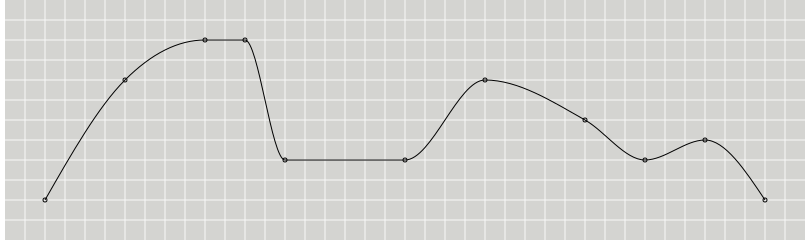
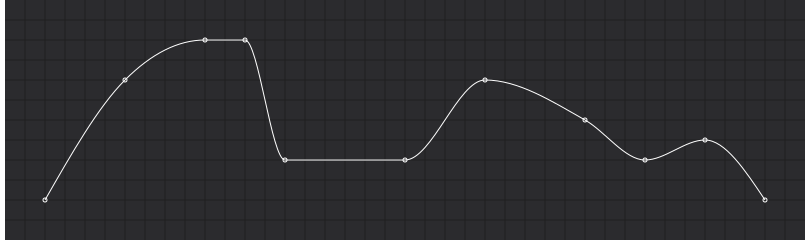
- detroit.curve_monotone_x(context: Path) Curve
Produces a cubic spline that preserves monotonicity in y, assuming monotonicity in x, as proposed by Steffen in A simple method for monotonic interpolation in one dimension: “a smooth curve with continuous first-order derivatives that passes through any given set of data points without spurious oscillations. Local extrema can occur only at grid points where they are given by the data, but not in between two adjacent grid points.”
Examples
>>> points = [
...     [2, 2],
...     [6, 8],
...     [10, 10],
...     [12, 10],
...     [14, 4],
...     [20, 4],
...     [24, 8],
...     [29, 6],
...     [32, 4],
...     [35, 5],
...     [38, 2],
... ]
>>> line = d3.line().curve(d3.curve_monotone_x)
>>> line(points)
'M2,2C3.333,4.333,4.667,6.667,6,8C7.333,9.333,8.667,10,10,10C10.667,10,11.333,10,12,10C12.667,10,13.333,4,14,4C16,4,18,4,20,4C21.333,4,22.667,8,24,8C25.667,8,27.333,6.944,29,6C30,5.433,31,4,32,4C33,4,34,5,35,5C36,5,37,3.500,38,2'
Result
- detroit.curve_monotone_y(context: Path) Curve
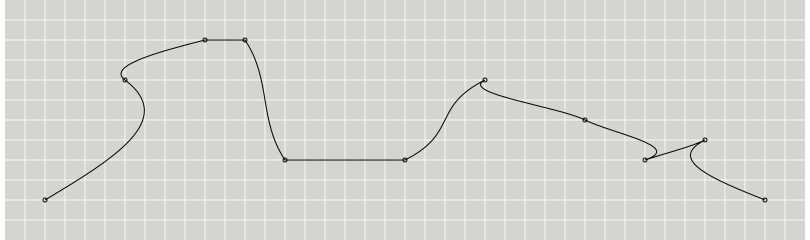
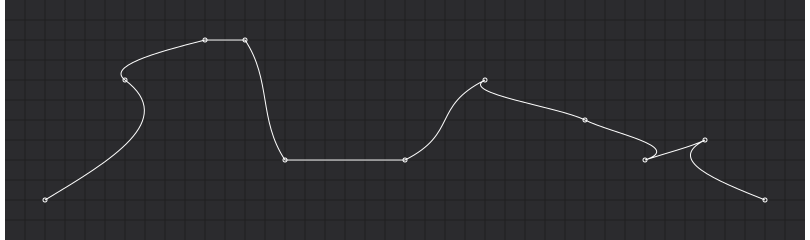
Produces a cubic spline that preserves monotonicity in x, assuming monotonicity in y, as proposed by Steffen in A simple method for monotonic interpolation in one dimension: “a smooth curve with continuous first-order derivatives that passes through any given set of data points without spurious oscillations. Local extrema can occur only at grid points where they are given by the data, but not in between two adjacent grid points.”
Examples
>>> points = [
...     [2, 2],
...     [6, 8],
...     [10, 10],
...     [12, 10],
...     [14, 4],
...     [20, 4],
...     [24, 8],
...     [29, 6],
...     [32, 4],
...     [35, 5],
...     [38, 2],
... ]
>>> line = d3.line().curve(d3.curve_monotone_y)
>>> line(points)
'M2,2C2.667,4,3.333,6,6,8C6.889,8.667,7.333,9.333,10,10C10,10,12,10,12,10C13.333,8,12.667,6,14,4C14,4,20,4,20,4C22.667,5.333,26.667,6.667,24,8C25.333,7.333,30.333,6.667,29,6C27.667,5.333,30,4.667,32,4C31,4.333,35.667,4.667,35,5C37,4,37.500,3,38,2'
Result
- detroit.curve_natural(context: Path) Curve
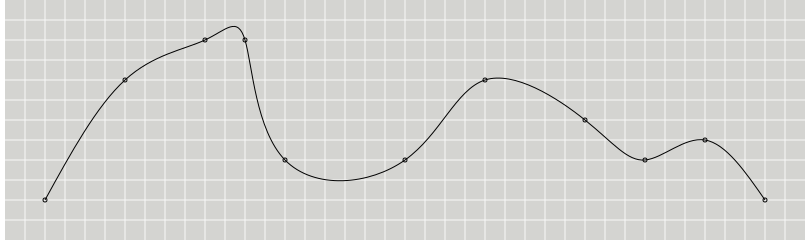
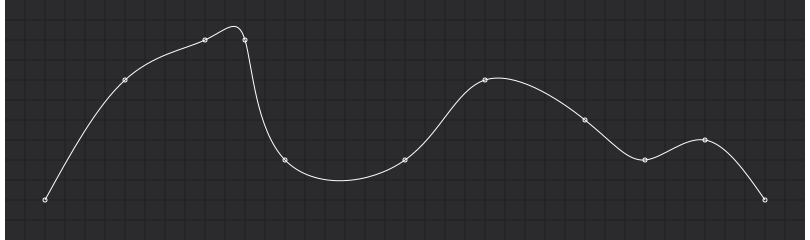
Produces a natural cubic spline with the second derivative of the spline set to zero at the endpoints.
Examples
>>> points = [
...     [2, 2],
...     [6, 8],
...     [10, 10],
...     [12, 10],
...     [14, 4],
...     [20, 4],
...     [24, 8],
...     [29, 6],
...     [32, 4],
...     [35, 5],
...     [38, 2],
... ]
>>> line = d3.line().curve(d3.curve_natural)
>>> line(points)
'M2,2C3.293,4.356,4.587,6.711,6,8C7.413,9.289,8.946,9.511,10,10C11.054,10.489,11.630,11.247,12,10C12.370,8.753,12.535,5.503,14,4C15.465,2.497,18.230,2.742,20,4C21.770,5.258,22.546,7.531,24,8C25.454,8.469,27.586,7.136,29,6C30.414,4.864,31.112,3.925,32,4C32.888,4.075,33.968,5.164,35,5C36.032,4.836,37.016,3.418,38,2'
Result
- detroit.curve_step(context: Path) Curve
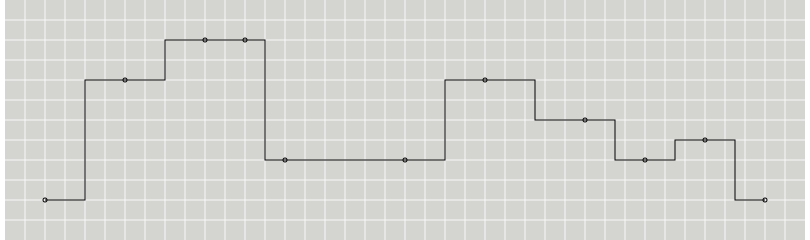
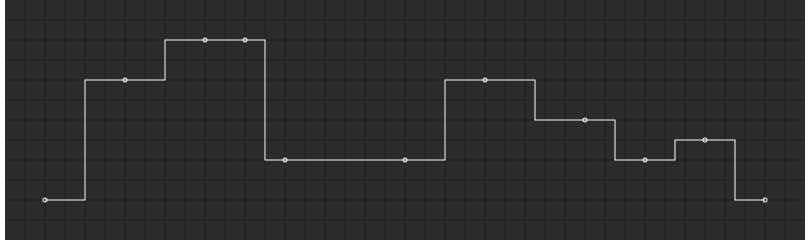
Produces a piecewise constant function (a step function) consisting of alternating horizontal and vertical lines. The y-value changes at the midpoint of each pair of adjacent x-values.
Examples
>>> points = [
...     [2, 2],
...     [6, 8],
...     [10, 10],
...     [12, 10],
...     [14, 4],
...     [20, 4],
...     [24, 8],
...     [29, 6],
...     [32, 4],
...     [35, 5],
...     [38, 2],
... ]
>>> line = d3.line().curve(d3.curve_step)
>>> line(points)
'M2,2L4,2L4,8L8,8L8,10L11,10L11,10L13,10L13,4L17,4L17,4L22,4L22,8L26.500,8L26.500,6L30.500,6L30.500,4L33.500,4L33.500,5L36.500,5L36.500,2L38,2'
Result
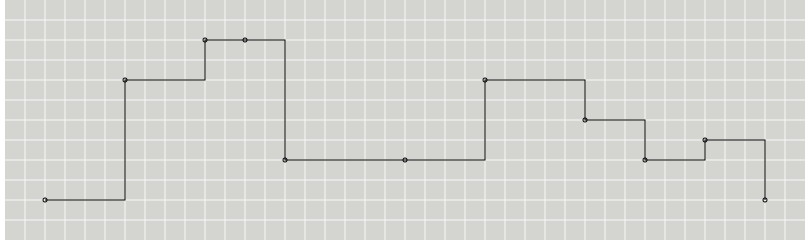
- detroit.curve_step_after(context: Path) Curve
Produces a piecewise constant function (a step function) consisting of alternating horizontal and vertical lines. The y-value changes after the x-value.
Examples
>>> points = [
...     [2, 2],
...     [6, 8],
...     [10, 10],
...     [12, 10],
...     [14, 4],
...     [20, 4],
...     [24, 8],
...     [29, 6],
...     [32, 4],
...     [35, 5],
...     [38, 2],
... ]
>>> line = d3.line().curve(d3.curve_step_after)
>>> line(points)
'M2,2L6,2L6,8L10,8L10,10L12,10L12,10L14,10L14,4L20,4L20,4L24,4L24,8L29,8L29,6L32,6L32,4L35,4L35,5L38,5L38,2'
Result
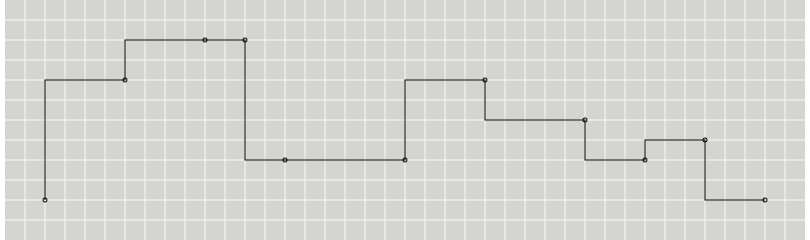
- detroit.curve_step_before(context: Path) Curve
Produces a piecewise constant function (a step function) consisting of alternating horizontal and vertical lines. The y-value changes before the x-value.
Examples
>>> points = [
...     [2, 2],
...     [6, 8],
...     [10, 10],
...     [12, 10],
...     [14, 4],
...     [20, 4],
...     [24, 8],
...     [29, 6],
...     [32, 4],
...     [35, 5],
...     [38, 2],
... ]
>>> line = d3.line().curve(d3.curve_step_before)
>>> line(points)
'M2,2L2,8L6,8L6,10L10,10L10,10L12,10L12,4L14,4L14,4L20,4L20,8L24,8L24,6L29,6L29,4L32,4L32,5L35,5L35,2L38,2'
Result
Custom curve
- class detroit.shape.curves.common.Curve
Curves are typically not used directly, instead being passed to line.curve and area.curve. However, you can define your own curve implementation should none of the built-in curves satisfy your needs using the following interface; see the curveLinear source for an example implementation. You can also use this low-level interface with a built-in curve type as an alternative to the line and area generators.
- abstractmethod area_start()
Indicates the start of a new area segment. Each area segment consists of exactly two line segments: the topline, followed by the baseline, with the baseline points in reverse order.
- abstractmethod area_end()
Indicates the end of the current area segment.
- abstractmethod line_start()
Indicates the start of a new line segment. Zero or more points will follow.
- abstractmethod line_end()
Indicates the end of the current line segment.
- abstractmethod point(x: float, y: float)
Indicates a new point in the current line segment with the given x- and y-values.
- Parameters:
x (float) – x value
y (float) – y value